Generate printable professional invoices as self-contained HTML, tailored by industry template and country tax rules (GST/VAT/HST/sales tax, ABN, VAT number, GSTIN, TRN, Fapiao notes). Use when the user asks for an invoice, tax invoice, GST/VAT invoice, proforma invoice, bill, or industry/country invoice template.
40 downloadsv0.1 · 2026-11-15
Cover only — add a root video such as code-to-butterfly.mp4, or assets/starter/index.html, for a live preview.
Before you choose this pack
Delivery & requirements
Your inputs
Bring your audience, primary task, representative content and required brand assets. Follow any additional inputs in the pack instructions.
Included files
10 entries in the extracted inventory. SKILL.md is present. See the file list below for recorded contents.
Listed environment
Stack: not specified. Listed agents: Claude, Cursor. This is catalog compatibility information; exact host and dependency versions are not independently verified here.
Preview & output
Use the description and recorded file list to confirm the deliverable. A cover image alone does not establish a runnable starter.
Dependencies & costs
A complete dependency and external-cost declaration has not been verified for this listing. Check the pack instructions for required tools, model/API access and any rendering charges before running it.
Verification scope
Inventory extracted 2026-11-15. Extraction records do not certify runtime behavior, responsive layouts, accessibility or deployment readiness.
Recorded examples: invoice.jpg · SKILL.md. The inventory identifies files; inspect their instructions for actual behavior.
Invoice is a self-contained skill for printable professional invoices. It produces a single `invoice.html` (browser Print → PDF) with seller and buyer blocks, line items, tax rates, discounts, and country-typical labels—no Online Invoices account, CDN, or payment gateway required.
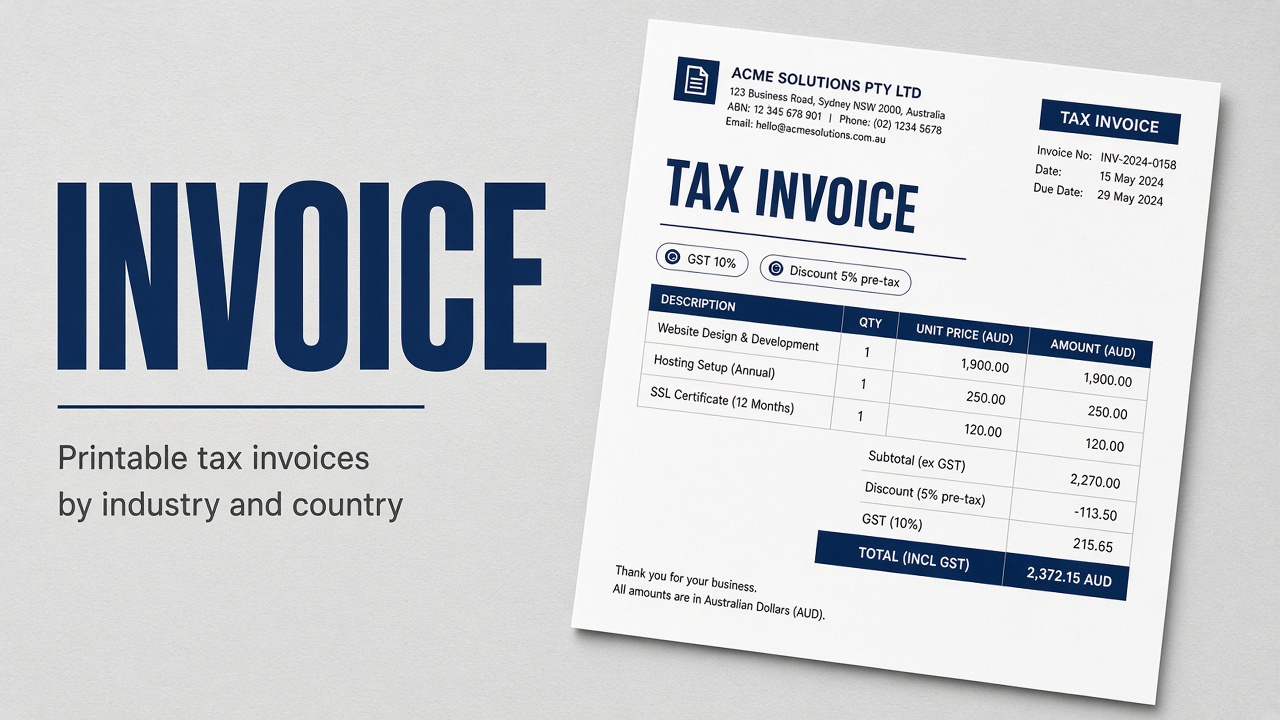
Industry catalogs (consulting, software, medical, trades, and more) and country tax profiles (Australian GST, UK VAT, Canada HST/GST, Singapore GST, India GST, UAE TRN, US state sales tax, and others) drive field extras and wording. Tax name/rate and discount type/value/timing are first-class parameters; the AU GST showcase demonstrates Total without GST / GST / Total with GST.
What you can do
Generate a printable self-contained `invoice.html` from the bundled letter template
Choose an industry profile for line-item columns and billing cues (hours, vehicle, matter #, and similar)
Apply a country/tax variant (GST, VAT, HST, sales tax) with matching currency and title wording
Set tax rate parameters (`taxes[].name` + `rate`) and per-line GST / No tax flags
Set discount parameters: percent or fixed, pre-tax or post-tax
Track optional Paid Amount and Balance Due
Produce SAMPLE demos or DRAFT invoices when facts are incomplete—never invent tax IDs or bank details
Open the product showcase and full AU GST sample for reference
Who it’s for
Freelancers, agencies, and SMBs that need a clean printable tax invoice quickly
Teams billing across AU, UK, EU, CA, SG, IN, UAE, US states, and similar markets
Software, consulting, trades, medical, retail, and other industries with different line layouts
Anyone who wants local HTML/PDF output without signing up for an invoicing SaaS
How to use it
Install the pack into your agent skills folder, then start a new Agent session. Invoke by naming the skill or describing an invoice scenario, for example:
`/invoice` help me generate a printable tax invoice
Use `invoice` to build an Australian GST invoice with a 10% tax rate and a 5% pre-tax discount
Follow the skill’s default prompt: `Use $invoice to create a printable invoice.html. Ask me to choose industry and country/tax variant if unclear, then collect missing seller, buyer, line items, tax rate and discount parameters before generating.`
Include industry, country, and amounts when you can. The agent should follow the Generate steps below and ask before guessing tax rates or discounts.
What’s in the pack
agents/
assets/
references/
invoice.jpg · 284 KB
SKILL.md · 7.7 KB
Install Invoice (invoice) with the CLI, or download the zip and place it by hand.
Install with AI
Let your AI handle the setup.
Recommended. Authorizes this machine, then writes Invoice into your agent skills folders.
1 · Login
npx skillux login
Opens the browser to authorize this machine.
2 · Install
npx skillux add invoice
Writes the pack into your agent skills folders.
3 · Update
npx skillux update
Pulls newer versions for packs you already installed.


 v0.1 · 2026-11-15