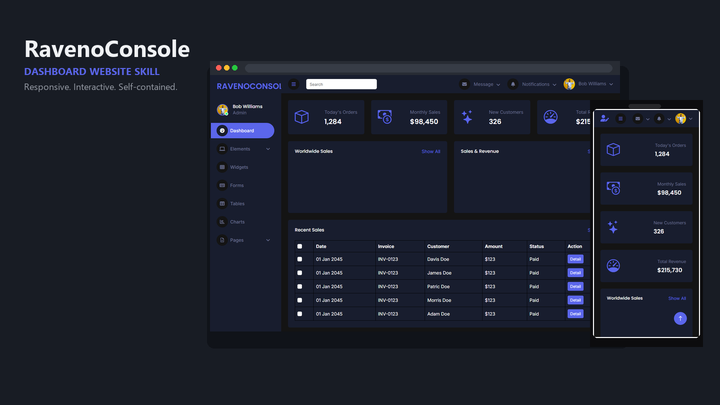
Build English Bootstrap Brain “Console” analytics admin sites with Inter (bundled), Bootstrap Icons, ApexCharts, jsVectorMap, FullCalendar, Quill, and vendored Bootstrap JS—no CDN runtime dependencies in the starter.
1 downloadsv0.1 · 2026-11-07
Loading site preview…
Before you choose this pack
Delivery & requirements
Your inputs
Bring your audience, primary task, representative content and required brand assets. Follow any additional inputs in the pack instructions.
Included files
90 entries in the extracted inventory. SKILL.md is present. See the file list below for recorded contents.
Listed environment
Stack: not specified. Listed agents: Claude, Cursor, Codex. This is catalog compatibility information; exact host and dependency versions are not independently verified here.
Preview & output
A browsable site entry is recorded in the pack. It is a preview, not evidence of a connected backend or a successful production deployment.
Dependencies & costs
A complete dependency and external-cost declaration has not been verified for this listing. Check the pack instructions for required tools, model/API access and any rendering charges before running it.
Verification scope
Inventory extracted 2026-11-07. Extraction records do not certify runtime behavior, responsive layouts, accessibility or deployment readiness.
Recorded examples: SKILL.md · tokens.css · web-design-console-analytics.png. The inventory identifies files; inspect their instructions for actual behavior.
Console Analytics packages Mobanwang demo [21554](https://www.mobanwang.com/mb/demo/21554/) (Bootstrap Brain Console): a sticky-header admin with off-canvas navigation, Apex dashboard charts, jsVectorMap samples, calendar + Quill routes, and lightweight auth pages. Google Fonts, jsDelivr, and unpkg references are replaced with `vendor/` copies; the bundled CSS already contains Bootstrap 5.3.3.
What you can do
Generate a static English analytics / back-office console from the mirrored starter
Keep Apex chart grids, vector maps, full calendar, Quill editors, tables, cards, and marketing-style inner pages
Rebrand **`index.html`** output with `--brand` while the logo SVG stays illustrative (swap file if you need a custom mark)
Stay offline after generation: Inter, Bootstrap Icons, Bootstrap bundle, ApexCharts, jsVectorMap, FullCalendar, and Quill ship under `assets/starter/vendor/`
Who it’s for
Founders who need charts + map + calendar + rich forms without a bundler
Internal tools teams mocking SaaS-style admin chrome
Workshops that must avoid live CDNs
How to use it
`/web-design-console-analytics` help me generate an analytics operations dashboard website
Use `web-design-console-analytics` to build a console admin; brand it Console Analytics
Follow the skill’s default prompt: `Use $web-design-console-analytics to create an English analytics or operations admin website branded Console Analytics with ApexCharts, jsVectorMap, calendar, Quill, bundled Inter and Bootstrap Icons, and local Bootstrap JS.`
Palette from pack tokens
Skill Primary / #0C63E4
Skill Success / #177A4C
Skill Accent / #723D46
Skill Danger / #C6303E
Skill Ink / #212529
Skill Muted / #6C757D
Skill Surface / #F8F9FA
Skill Border / #DEE2E6
What’s in the pack
agents/
assets/
references/
scripts/
SKILL.md · 2.9 KB
tokens.css · 315 B
web-design-console-analytics.png · 56 KB
Install Web Design Console Analytics (web-design-console-analytics) with the CLI, or download the zip and place it by hand.
Install with AI
Let your AI handle the setup.
Recommended. Authorizes this machine, then writes Web Design Console Analytics into your agent skills folders.
1 · Login
npx skillux login
Opens the browser to authorize this machine.
2 · Install
npx skillux add web-design-console-analytics
Writes the pack into your agent skills folders.
3 · Update
npx skillux update
Pulls newer versions for packs you already installed.


 v0.1 · 2026-11-07