Free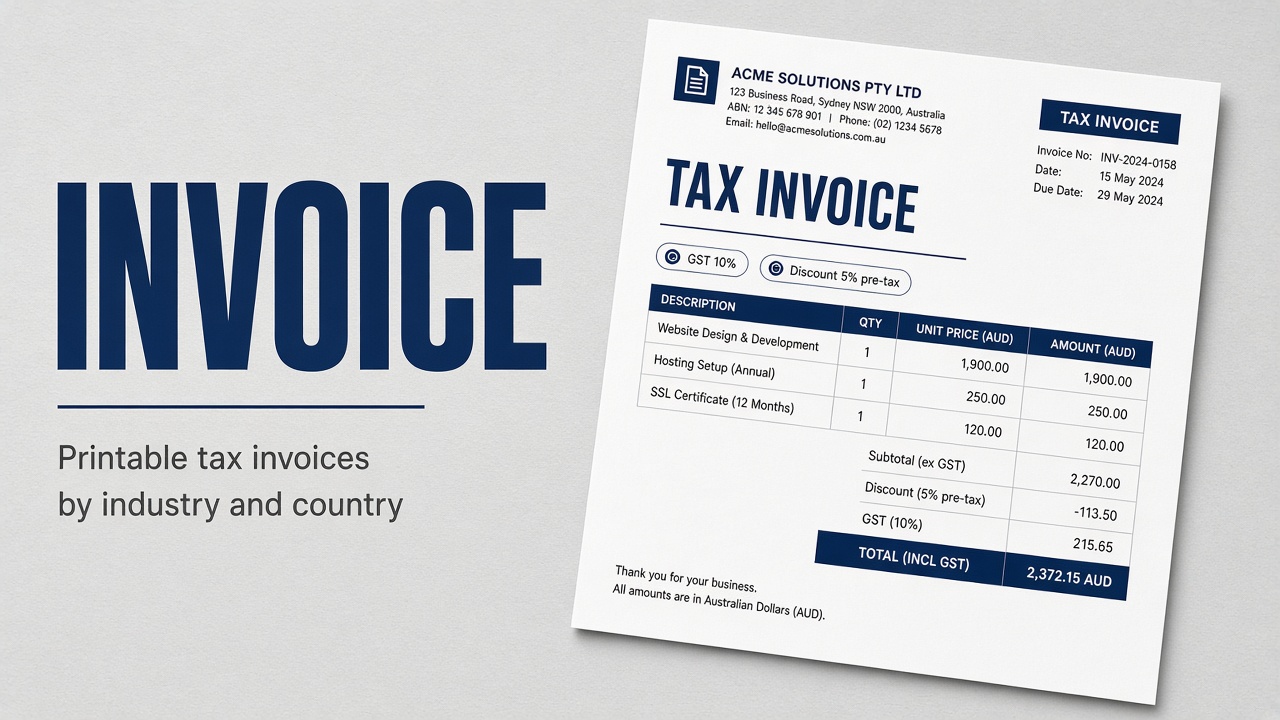
A template that survives your second client
A downloaded invoice template fails freelancers in a predictable way: it looks fine for the first client, then the second client is in another country, the third pays by milestone instead of by hour, and the file becomes a hand-edited mess of stale tax labels and last month's line items. A useful template separates what never changes from what changes every job. The Skillux Invoice skill builds that separation in: your confirmed business details, tax profile, and payment details stay fixed, while number, dates, client, and items are collected fresh for each invoice.
Last updated 2026-11-07
From the live Skillux catalog
1 matching skill. Check each listing for its contents and license.
Put the skill to work
Fixed: your business name and address, logo or letterhead treatment, tax registration identifiers you have confirmed, payment details, and your standard payment terms. Per job: invoice number, issue and due dates, client name and address, line items and quantities, and any discount. A template that hard-codes the second list — or makes you re-type the first — is working against you.
Invoice numbers must be unique and sequential for your records to hold up. A static template invites the classic error of sending last month's file with last month's number still on it. Because the skill asks for the number and dates on every run — and flags an incomplete brief as a DRAFT instead of quietly reusing old values — the sequence stays deliberate rather than accidental.
Freelance work rarely fits one table. The skill's industry directions cover billable hours, fixed-project work, day rates, deposits and balances, and dozens of other trades, and the line columns adapt to the work being billed. The same confirmed layout can carry an hourly consulting invoice on Monday and a fixed-fee design invoice on Friday without rebuilding the document.
Templates break quietly on tax: a rate typed into a total cell, a discount applied after tax when your rules say before. The skill takes named tax rates, per-line tax flags, and percentage or fixed discounts applied before or after tax as explicit parameters, and prints the rate in the totals label so the arithmetic stays reviewable on every invoice the layout produces.
The Invoice skill is free. The hub page shows the full output — cover, showcase, and a complete printable sample — so you can judge the layout before installing the pack into Claude, Cursor, or Codex.
Walk the skill through your business identity, country tax profile, and payment details. Ask for a clearly marked SAMPLE invoice first and check the layout, the totals block, and the print rendering at A4 or Letter before any real client sees it.
For each engagement, supply the client, number, dates, and items. Review the generated invoice.html against the job — especially the due date and the tax label — then Print → PDF. Edit the HTML directly when a client needs a one-off variation, and fold anything recurring back into your brief.
A static file template gives you a layout and leaves every calculation, tax label, and numbering decision to manual editing — which is where errors creep in. The Invoice skill generates the invoice from a brief each time: it collects the per-job details, applies your confirmed tax and discount parameters, and produces a self-contained printable HTML file. The trade-off is that you work through an AI agent instead of typing into a spreadsheet.
The layout can; the tax block should not be frozen. The skill carries 20+ country tax profiles with their own currency, date format, and tax wording, and confirms the variant with you — for example VAT-registered versus not — before generating. Keep your identity and payment details fixed, and let the profile drive the tax presentation per client.
A single self-contained invoice.html with inline CSS. Open it in a browser to review or edit it, and use Print → PDF when you need a PDF. There are no external fonts or hosted services involved in the document itself, so archived invoices keep rendering exactly as sent.
Yes — the output is plain HTML and CSS in your project, so you or your agent can adjust the layout, spacing, and letterhead treatment and then reuse the adjusted version. Check the pack's license on its listing for what you may do with the skill's own files.