Free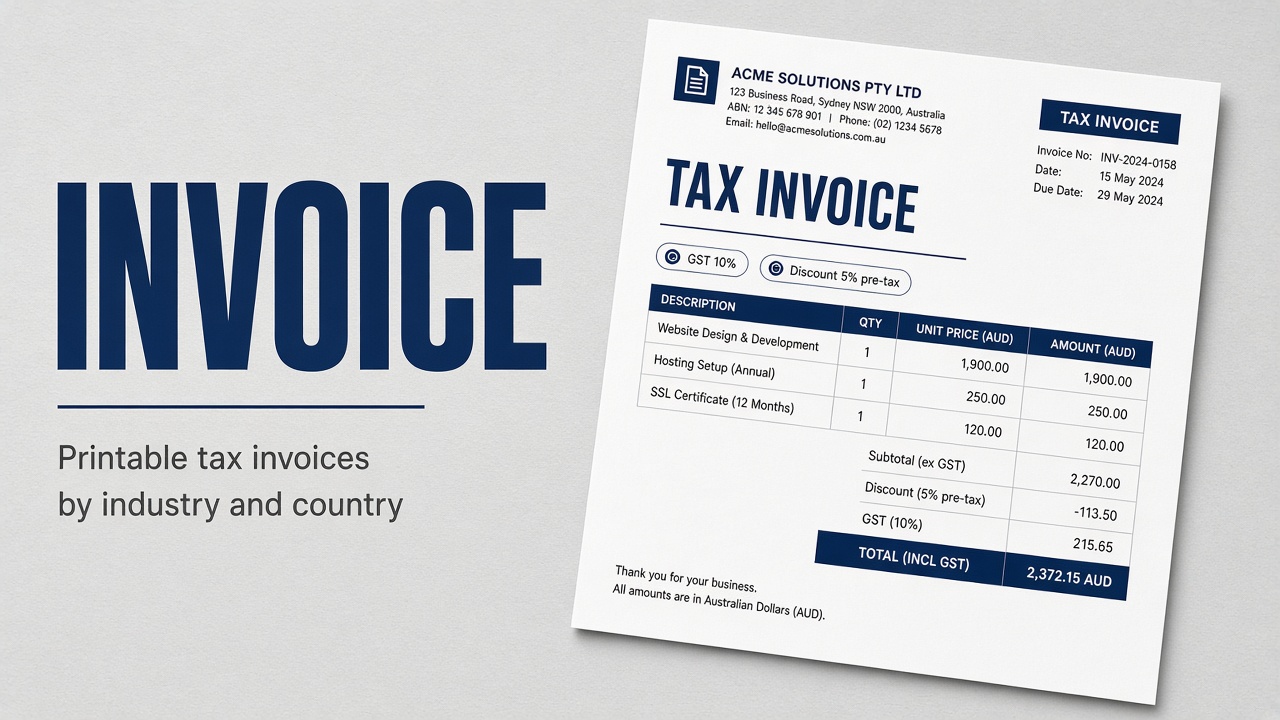
One invoice, the right country's rules
In VAT and GST countries, 'tax invoice' is not a casual label for a bill: it is the document the buyer's finance team needs before they can reclaim the tax they paid you, and each jurisdiction prescribes its own required fields, identifier names, and totals layout. A template built for one country quietly fails in another — the tax number is called something else, the numbering rule differs, or the tax amount is not shown the way local rules expect. The Skillux Invoice skill generates the invoice from your brief and applies one of its 20+ country tax profiles, so the wording, currency, date format, and totals structure follow the client's country instead of your home defaults.
Last updated 2026-11-07
From the live Skillux catalog
1 matching skill. Check each listing for its contents and license.
Put the skill to work
Under VAT and GST systems, the buyer can usually only reclaim the tax on a purchase if the document they hold meets the local definition of a tax invoice. That definition is structural: the document must identify itself as a tax invoice, name the seller and show the seller's tax registration number, carry a unique sequential number and an issue date, describe what was supplied, and show the tax amount separately from the net price. Miss the registration number, or bury the tax inside the total, and the buyer's accounts team can reject the document — and your payment waits while it is reissued.
The VAT pattern is the reference most profiles build on: a unique number from an unbroken sequence, the seller's VAT number, the date of issue and — where it differs — the date of supply, the customer's name and address, a description of the goods or services, and totals that separate the net amount, the VAT charged on it, and the gross. Cross-border business-to-business supplies inside the EU often use reverse-charge wording, where the buyer accounts for the VAT instead of the seller charging it; that changes the words and the totals, not just the rate. Member states also localise the label — Germany's MwSt is the same tax wearing a local name. The skill's profiles carry these wording and label conventions per country, and confirm the variant with you rather than assuming it.
GST jurisdictions reuse the VAT skeleton with their own identifiers and document conventions. An Australian tax invoice shows the seller's ABN and states the GST amount, or that the total price includes GST. An Indian GST invoice revolves around the GSTIN of the parties. Singapore and New Zealand follow the same pattern with their own registration numbers and tax invoice wording. The practical lesson is that the fields travel but the names do not: a template that hard-codes 'VAT number' produces a subtly wrong document in Sydney or Singapore. Choosing the country profile in the skill swaps the identifier names, currency, and date format together.
Two invoices for the same job can both be internally consistent and still show different totals, because one quotes prices with tax included and the other adds tax on top. Which presentation applies depends on the profile and on how you priced the work — and a discount changes the taxable base depending on whether it is applied before or after tax. The Invoice skill takes these as explicit parameters: tax-inclusive or tax-exclusive pricing, named rates, per-line tax flags for mixed supplies, and percentage or fixed discounts applied before or after tax, with the rate printed in the totals label so anyone can re-perform the arithmetic from the document alone.
A formatted commercial invoice is not the same as a statutory e-invoice. Some jurisdictions route tax invoices through official channels — China's fapiao system, India's invoice registration, Peppol networks in parts of Europe and beyond — and a generated HTML document does not replace those channels; the skill says so when a profile touches one of them. Catalog defaults are presentation suggestions, not tax advice: your registration status, the rate that applies to your supply, and your filing obligations are yours to confirm, and the skill asks about them instead of inventing a tax ID or a rate.
The Invoice skill is free. On the hub page, check the country and tax list — Australian GST, UK VAT, NZ GST, Canadian HST/GST, EU VAT, India GST, Singapore GST, UAE VAT, USA sales tax, Germany MwSt, and more — then install the complete pack into Claude, Cursor, or Codex.
Walk the skill through your registration status, the rate that applies, whether your prices are tax-inclusive or exclusive, and any discount and its timing. It asks about variants — VAT-registered versus not is the common one — and marks an incomplete brief as a DRAFT with a questions file instead of guessing.
Check the sequential number, the registration identifier, and that net, tax, and gross read as three reconcilable figures. Print → PDF from the browser or send the HTML as it is; the archived file keeps rendering exactly as issued.
In VAT and GST jurisdictions, a tax invoice is the document that lets the buyer reclaim the tax they paid, so the law prescribes its contents: it identifies itself as a tax invoice, shows the seller's tax registration number, a unique sequential number, the issue date, a description of the supply, and the tax amount separately from the net price. A plain invoice missing those elements may still request payment, but it does not do the tax document's job.
Structurally: the words identifying it as a VAT invoice, a unique number from an unbroken sequence, the seller's name, address, and VAT number, the date of issue and — where different — the date of supply, the customer's name and address, a description of what was supplied, and totals separating the net amount, the VAT amount, and the gross. Where reverse-charge wording applies, that statement replaces the charged VAT. Exact requirements vary by country, which is why the skill works from per-country profiles.
The layout can; the tax block should not be frozen. The skill carries 20+ country tax profiles — UK VAT, Australian GST, EU VAT, India GST, Canadian HST/GST, UAE VAT, and others — each with its own identifier names, currency, date format, and tax wording, and it confirms the variant with you, such as VAT-registered versus not, before generating. Keep your identity and payment details fixed and let the profile drive the tax presentation per client.
Generally no: an unregistered seller does not charge the tax, so their invoices are ordinary invoices without the tax document's fields. The skill's profiles include registered and unregistered variants and confirm your status before generating. When you must register is a local-rules question that depends on your turnover and where your customers are — the catalog is a formatting aid, not tax advice, so confirm your obligations separately.
No. It generates a self-contained commercial invoice.html you can print or save as PDF. Statutory channels — China's fapiao issuance, India's invoice registration number system, Peppol networks — remain separate official processes, and the skill flags when a profile touches one of them. It also does not send invoices or collect payment.